


If you’re sorting this out near Magical Smiles in Caroline Springs, this guide walks through what usually happens and what only a check-up can decide.
You’re ready to arrange a dental visit, but the booking screen leaves you wondering which option to choose. What if you select the wrong appointment, miss an important detail or need to speak with someone first?
That uncertainty is normal. Online appointment booking gives you a practical starting point, and you can still call the dental team if your concern doesn’t fit neatly into one of the available choices.
Not sure which dental appointment to book?
You don’t need to work out exactly what treatment you require before making an appointment. In fact, symptoms that seem similar can have different causes. An examination is often needed before a dentist can explain what’s happening and discuss suitable options.
Start with the main reason you want to visit. Are you arranging a routine dental examination, asking about a change in your teeth, booking for a child or seeking advice about a sore wisdom tooth? Choose the option that most closely matches that reason. Close is usually enough at this stage.
If none of the choices seems right, don’t guess your way through several screens. You can use the form to request a dental appointment or call the team and briefly explain what’s going on. They can clarify the type of visit you’re trying to arrange without attempting to diagnose you over the phone.
It also helps to keep expectations clear. Selecting an appointment category doesn’t establish what treatment you’ll need, and sending a request may not mean that a particular time has been confirmed. Pay attention to the message shown after submission and to any follow-up communication from the practice.
How online appointment booking works at Magical Smiles
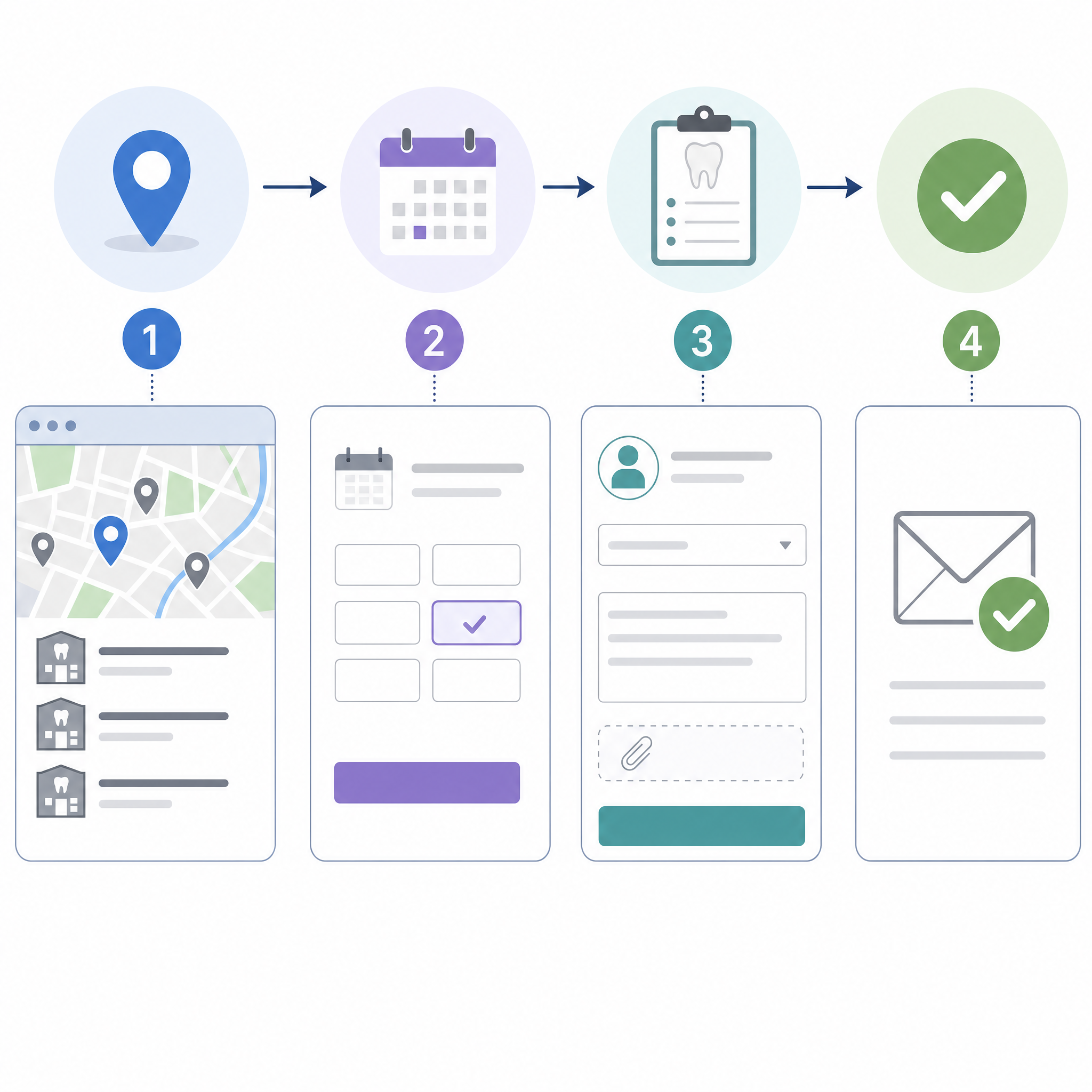
The live appointment page gives you several ways to make contact. You can select an available time through the online calendar, call the clinic or send a message. If you can’t find your preferred date or time, the page also provides a separate appointment-request form.
Start with the booking pathway that suits your request
If the calendar shows an appropriate option, select the location, appointment details and time shown on the screen. Read each label carefully before moving forward, particularly if you’ve opened the page from a search result rather than from a location page.
If your preferred time isn’t displayed, use the request form rather than assuming the clinic has no other way to discuss your needs. A request allows the team to review what you’ve entered and respond using the contact details you provide. It shouldn’t be treated as an immediate clinical assessment.
The exact questions shown can vary with the pathway you select. If you’re asked for your name, phone number, email address or reason for visiting, check those details before submitting them. A mistyped number or email address can make it difficult for the team to contact you about the request.
A request and a confirmed appointment aren’t always the same thing
This distinction catches people out. A calendar selection may move through a different process from a form sent because your preferred date wasn’t visible. After you submit, look for wording that explains whether the appointment is booked or whether the clinic still needs to contact you.
Keep any confirmation message or email you receive. If you don’t understand the status, call the selected clinic rather than submitting the same request several times. Tell the team your name, the location you selected and approximately when you completed the form. That gives them useful details to check.
Flexible booking options mean you can begin online or speak with the team. They don’t mean that every appointment type or time will be available, so wait for the relevant confirmation before organising your day around the visit.
What to include in your appointment request
A useful booking note is short, specific and written in everyday language. You’re not expected to provide a dental diagnosis. Describe what you’ve noticed, where it is and when it started.
For example, “lower right tooth has been sore when chewing since yesterday” gives the team more context than “tooth problem”. If there’s swelling, a damaged tooth, bleeding or a recent injury, say so plainly. Mention if the symptoms are getting worse or are affecting eating, sleeping, swallowing or breathing.
Details that can help the team understand your request
- Your main reason for visiting: a routine check, a new symptom, a damaged tooth or a discussion about possible treatment.
- Where the concern is: upper or lower mouth, left or right side, gum, tooth or jaw if you can tell.
- When it began: today, several days ago or over a longer period.
- Changes you’ve noticed: swelling, sensitivity, bleeding, a sharp edge or difficulty opening your mouth.
- Anything time-sensitive: rapidly worsening symptoms, recent facial trauma or a problem affecting normal eating or drinking.
You can also indicate whether the visit concerns general dentistry, family dental care, cosmetic dentistry or a wisdom teeth consultation. These broad categories help describe why you’re getting in touch, but they don’t establish that a particular procedure is suitable for you.
Try not to write a long medical history into a small booking box. Include the immediate concern and accurate contact details. The clinic can ask for further health information through its usual patient process, and the dentist can discuss it with you during your visit.
Online descriptions have limits. A dentist may need to examine your mouth, ask about your health and medicines, and use clinically appropriate investigations before providing individual advice. Photos and written notes can miss details that matter.
Which location should you choose?
The practice provides multi-location access across Melbourne’s western growth corridor. Caroline Springs may be a practical option if you live or work in Melbourne’s west, while Point Cook and Bacchus Marsh are also listed as clinic locations.
Choose the location you genuinely intend to attend. Similar page designs and clinic names can make it easy to click through without noticing that a different location is selected.
Check these details before you submit
- Read the clinic location shown on the booking page or calendar.
- Check that the date and time match what you intended to select.
- Confirm that your phone number and email address are accurate.
- Review the reason for your visit, especially if you’ve mentioned an urgent symptom.
- Look for the on-screen message explaining what happens next.
If you live near Point Cook or Bacchus Marsh, select based on the location and appointment option that suit your circumstances. Don’t rely on an assumed travel time; traffic, your starting point and the time of day can change the trip considerably.
Already submitted to a different location? Call the clinic rather than sending several replacement forms. Explain what happened and which location you meant to choose. The team can then tell you what information they need from you.
When should you call instead of booking online?
When to book online and when to call
| Your situation | A practical next step | Why |
|---|---|---|
| You’re arranging a routine visit and can see a suitable option | Use the online calendar | You can enter the requested details and review the selection on screen |
| Your preferred date or time isn’t displayed | Send an appointment request or call | The team can respond about the request without you choosing an unsuitable category |
| You’re unsure which appointment type fits | Call the clinic | You can explain the concern and ask which booking pathway to use |
| You have pain, swelling or a damaged tooth | Call and describe the symptoms | The team needs clear information to discuss an appropriate next step |
| Symptoms are severe or worsening rapidly | Seek urgent clinical help | An online form isn’t an emergency assessment |
| You have trouble breathing or swallowing, uncontrolled bleeding or significant facial trauma | Seek urgent medical help immediately | These symptoms shouldn’t wait for an online booking response |
Call if the problem feels urgent, is hard to explain in a form or leaves you unsure which appointment to select. Say what is happening now rather than trying to name the cause. The person answering can gather booking information, but only an appropriate clinical assessment can determine what the symptoms mean.
Online booking isn’t a substitute for emergency care. If you have severe or rapidly worsening symptoms, difficulty breathing or swallowing, uncontrolled bleeding or significant facial trauma, seek urgent medical help. Don’t wait for an email, form response or routine dental appointment.
If you’re uncertain about the level of urgency but your condition is changing, call. Be ready to explain when it started, what has changed and whether you can eat, drink, breathe and swallow normally. Clear facts are more useful than minimising the problem or selecting the first online option you see.
Online appointment booking FAQs
Can I book online for general dentistry?
You can start an online booking or appointment request for general dental care. Select the closest available reason for visiting and add a short note if the form gives you space. The dentist will still need to assess your individual needs before recommending treatment.
Can I make a booking for family dental care?
Yes, you can use the booking pathway to arrange or request family dental care. Check that the details identify the person who will attend, particularly when you’re booking for a child or another family member. The clinic may need to clarify information with a parent, guardian or patient.
What about cosmetic dentistry or a wisdom teeth consultation?
You can request an appointment to discuss either concern. Booking a consultation doesn’t mean that a specific treatment has been decided. Suitability, alternatives, likely limitations and relevant risks can only be discussed properly after an individual assessment.
What if I don’t know which option to select?
Choose the broad option closest to your reason for attending, or call before submitting. A simple explanation such as “I have swelling near a back tooth” is more helpful than trying to decide for yourself whether you need a particular procedure.
How do I change information after sending a request?
Contact the selected clinic and explain what needs correcting. Give your name, the approximate submission time and the location you chose. Avoid including private health information in an unsecured message unless the practice specifically asks you to use that channel.
What should I do if I haven’t received confirmation?
First, check the on-screen status and any email or text message associated with your request. If it remains unclear, call the selected location. Don’t assume the appointment is confirmed merely because the form was submitted.
Where can I start?
You can book online with Magical Smiles or contact the team if you’d rather talk through your needs. For general oral-health information, you can also read more dental health advice.
This article provides general information only. Speak with a dentist for advice about your own symptoms, health history and circumstances. Seek urgent medical help for severe or rapidly worsening symptoms, breathing or swallowing difficulty, uncontrolled bleeding or significant facial trauma.
For general dental health information, see Healthdirect dental care and the Better Health Channel teeth guide.